
XiXi eMail Verifier4.2 - Download
You'll be able to download in few seconds.
Publisher Description
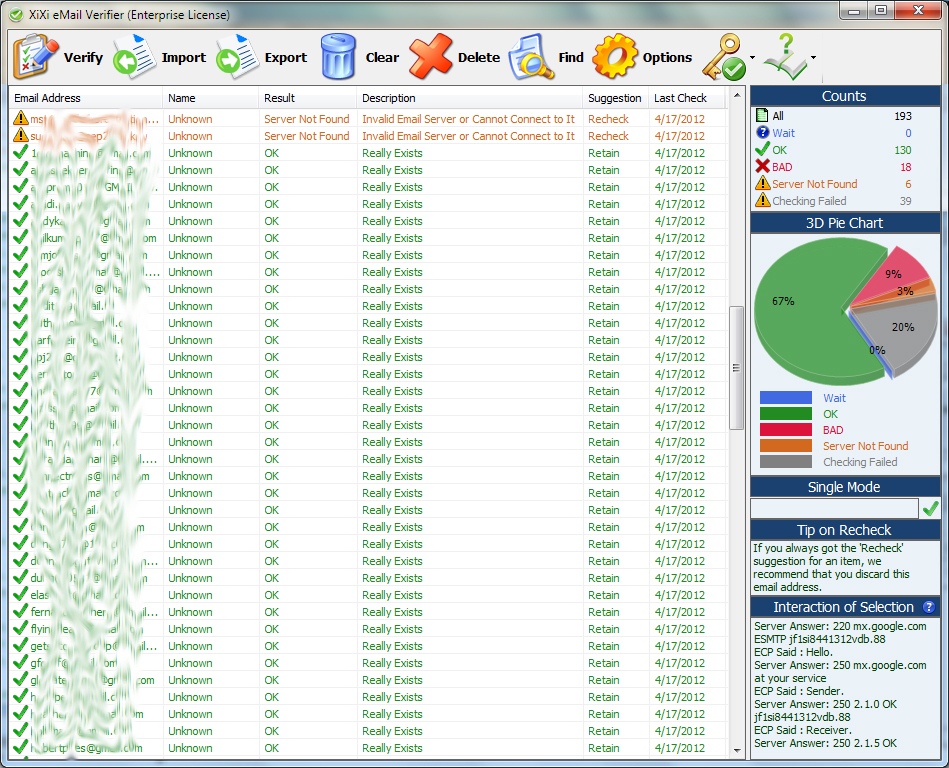
XiXi eMail Verifier is used to verify the email addresses are valid (format) and real existing on the email servers in BATCH mode, no actual eMail sending needed. Normally, you may use it to keep a reliable eMail addresses listing. It has the high-speed Verification based on the multi-threaded technology, about hundreds of email addresses per minute, this is also relied on your PC and network speeds. Also, it is easy to use: 1. input your original eMail addresses from the .txt (tab separated), .csv (comma separated values) or Excel Documents (.xls / .xlsx). 2. Click "Verify" button, the results will show soon (even better: real-time updates the results during verifying). You can also output all verified results to txt/csv/xls/xlxs files as you need. Except reports the results in a traditional listing, XiXi eMail Verifier also shows them in a visual statistics by counts and 3D pie chart for each status. The more visual is: the counts and 3D pie chart are updated in real-time during verifying. Key features: Verify eMail Existence & Validity (Format) Both without Sending. Verify eMail Addresses in Batch Mode. Supports to Input / Output eMail Addresses (txt, csv, xls, xlsx). High-speed Verification Based on Multi-threaded Technology. Provides Real-time Verifying Statistics (Counts & 3D Chart for each Status). High-speed Input / Output Technology for Excel Data Source. Also Reports Result Explanation, Interaction between XXEV and eMail Servers. Provides Many Options, Such as Verification / Output Rules, and Many More
About XiXi eMail Verifier
This Email List Management program is available in English. It was last updated on 29 September, 2026. XiXi eMail Verifier is compatible with the following operating systems: Windows.
The company that develops XiXi eMail Verifier is XiXi Software. The latest version released by its developer is 4.2.
The download we have available for XiXi eMail Verifier has a file size of 1.0 MB. Just click the green Download button above to start the downloading process. The program is listed on our website since 2014-10-17 and was downloaded 0 times. We have already checked if the download link is safe, however for your own protection we recommend that you scan the downloaded software with your antivirus. Your antivirus may detect the XiXi eMail Verifier as malware if the download link is broken.
How to install XiXi eMail Verifier on your Windows device:
- Click on the Download button on our website. This will start the download from the website of the developer.
- Once the XiXi eMail Verifier is downloaded click on it to start the setup process (assuming you are on a desktop computer).
- When the installation is finished you should be able to see and run the program.
Program Details
System requirements
Download information
Pricing
Version History
version 4.2
posted on 2014-10-17
Moved all actions which need to run the default email client to the online webpages, in order to avoid the confusion if who has not a default email client. Changed the font style of the drop-down menu items on the main interface to regular (previous versions are bold). Redesigned the licenses.
Disclaimer
External Download
We do not host XiXi eMail Verifier on our servers. We did not scan it for viruses, adware, spyware or other type of malware. This app is hosted by the software publisher and passed their terms and conditions to be listed there. We recommend caution when installing it.
The external download link for XiXi eMail Verifier is provided to you by apps112.com without any warranties, representations or guarantees of any kind, so access it at your own risk.
If you have questions regarding this particular app contact the publisher directly. For questions about the functionalities of apps112.com contact us.
